
This blog post was made in collaboration with LUMOS and all my opinions are my own.
As someone who juggles content creation and academic writing, I’m always on the lookout for tools that can simplify my workflow without blowing up my budget. So when I came across the LUMOS Tablet, which promises 8GB RAM, a 10.1-inch IPS display, and a full accessory bundle — all for just RM499 (+RM99 for accessories) — I was intrigued, but skeptical. After using it for one full week across both my blogging projects and psychology-related work, here’s my honest review. Spoiler: It might just be the best budget tablet for creators and students in Malaysia right now.

Unboxing & First Impressions: Surprisingly Premium
Right out of the box, the LUMOS Tablet made a solid first impression. The matte finish and sturdy build give it a premium feel, while the 10.1” screen feels spacious yet compact enough to slip into my tote bag. For someone who moves between study spaces and cafes often, that’s a big plus.
As a visual person, the 4K supported screen resolution was the first thing that impressed me. Whether I was watching clinical interview recordings or editing blog graphics, the colors were sharp and vivid. Watching Netflix or scrolling through Instagram felt like an experience you’d expect from tablets priced two or even three times higher.
Design rating: 9/10 — Sleek, simple, and surprisingly elegant for a budget model.
Performance: A Budget Tablet That Performs Like a High-End Model
As a psychology grad, I often switch between reading journal articles, taking notes, listening to lectures, and editing content for my blog. Thanks to the 8GB RAM, multitasking felt smooth. I could play background music on Spotify while annotating PDFs or writing therapy reflections in WPS Office without any lag or crashes. The touch response is fast, and scrolling is fluid. To put it simply, this is a budget-friendly option that performs like higher-end models.
If you’re a student juggling study apps, mental health tracking tools, and maybe a bit of Instagram on the side – this tablet can absolutely keep up.
Mobile Productivity: From Tablet to Mini Laptop
One of my favorite features? The ability to turn the tablet into a mini-laptop. The LUMOS Tablet Bundle includes:
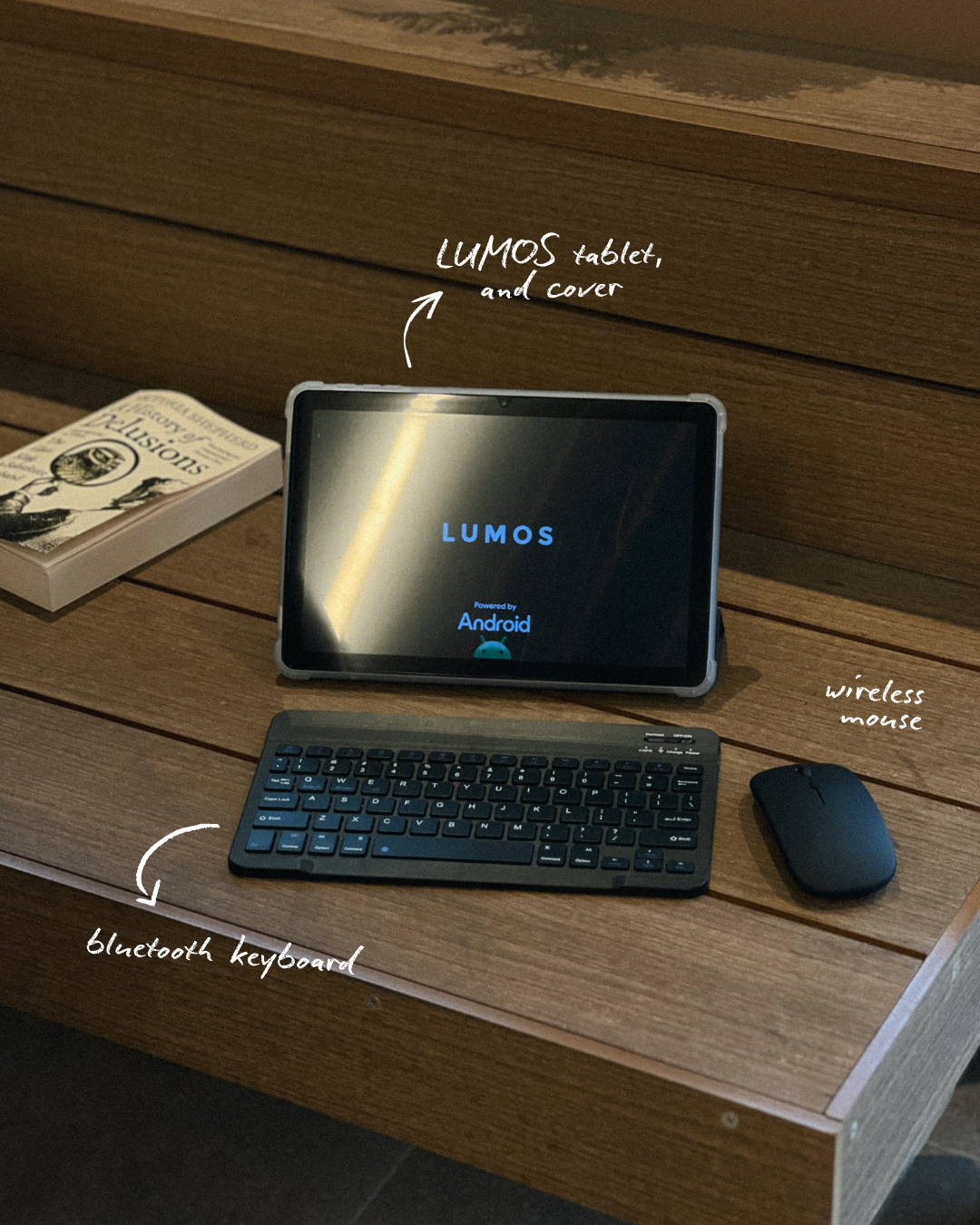
• A Bluetooth keyboard
• A wireless mouse
• A stylus pen
• A sturdy case cover
This setup turned the tablet into a mini workstation. I wrote a full blog post using the keyboard while referencing journal articles in split-screen mode. For online presentations and therapy session reviews, I used the stylus to jot down quick annotations. Writing emails, editing PowerPoint slides, and reading research papers felt effortless. It honestly felt like I had a laptop, minus the weight and bulk.
An excellent choice for psychology students, digital nomads, or early-career therapists on the go.
Entertainment & Relaxation: Because Mental Health Matters
Let’s be honest — not every moment has to be productive. As someone who values intentional rest, I tested the LUMOS Tablet for downtime too. Whether it was watching Netflix, catching up on psychology podcasts via YouTube, or scrolling through TikTok, the 4K supported screen and responsive interface made everything enjoyable. And the battery life? It lasted me nearly 8 hours with mixed use — reading, watching, and note-taking. That’s more than enough for a full study day or a creative work sprint.
TV Casting for Group Work or Presentations
One hidden gem is the built-in screen casting feature. I used it to mirror a slide deck on my Smart TV during a mock group therapy presentation with classmates. No extra cables, no setup fuss — just Wi-Fi and it worked instantly. This is a huge bonus for students, especially during remote learning or when practicing for live case presentations.
So, is LUMOS Tablet Worth The Hype?
As someone navigating both academic life and creative work, I need tools that are reliable, versatile, and affordable. The LUMOS Tablet checks all three.
Here’s what really stood out to me:
• A budget-friendly option that performs like high-end models
• Doubles as a tablet for work, study, and content creation
• The included accessories turn it into a portable mini-laptop
• The 4K supported screen is genuinely enjoyable for both study and self-care
• Long battery life that doesn’t leave you hanging mid-lecture
And for RM499 (+RM99 for accessories), it’s almost hard to believe it includes the keyboard, mouse, stylus, and cover.
Ideal for:
• University students
• Home-based entrepreneurs
• Teachers
• Content creators
• Anyone needing a tablet for work and study
Would I Recommend It?
Yes — absolutely. Especially if you’re a student, creator, remote worker, or anyone who wants a solid all-in-one tablet without spending a fortune.
I genuinely believe that more people in the mental health and content creation spaces should be aware of this device. It’s not just another budget tablet, it’s a thoughtful, well-rounded tool that fits into real-life needs.
If you’re tired of overpriced tablets that underdeliver, the LUMOS Tablet might be the refresh you need.
This hits 🎯 perfectly today